Android
- APK downloadable directly from buranslots.com
- Enable 'Install from unknown sources' in device security settings
- Compatible with modern Android browsers (Chrome recommended)
Buran Casino on Mobile
Install the Buran Android APK or add the iOS progressive web app to your home screen for full AUD casino access without the App Store or Google Play.
Install the Buran Casino Mobile App
Install the Buran Android APK or add the iOS progressive web app to your home screen for full AUD casino access without the App Store or Google Play.
Open on Mobile 18+ only. Play can become addictive, so gamble responsibly. Bonus offers are subject to their own terms.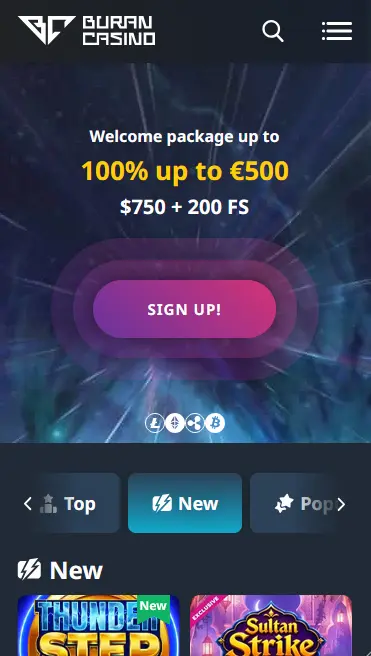
Buran Mobile: Strengths and Limitations
Pros
Cons
Device Requirements
Android
iOS
Mobile Security Best Practices
What You Should Do
What You Should Avoid
What Makes the Mobile Experience Work
No Store Required
The Android APK installs directly from buranslots.com, and iOS users add the PWA to their home screen via Safari. Neither platform requires the App Store or Google Play.
Fast Load Times
The PWA and APK both reduce load latency compared to a standard browser session, giving quicker access to the pokies lobby, live tables, and cashier.
Secure Mobile Sessions
All connections are protected by SSL encryption. Two-factor authentication and biometric login (where supported by the device) are available through the account security settings.
How to Get the Buran App
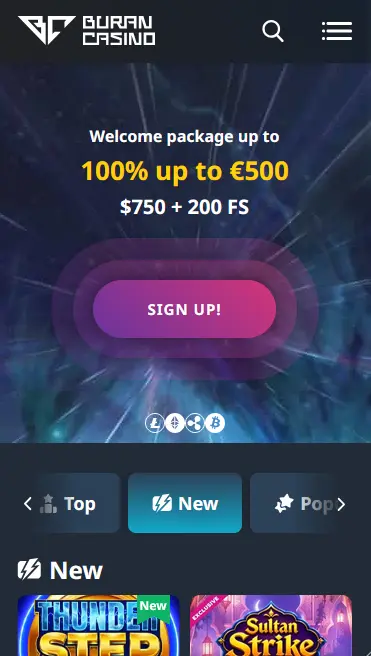
The Buran Casino mobile interface is a full-featured version of the desktop site, not a stripped-back companion app. From a single mobile account you can browse and play the entire 3,500+ game catalogue, access the AUD cashier to deposit and withdraw, manage your welcome bonus or VIP cashback, and reach the 24/7 live chat team.
The mobile interface organises the catalogue into the same lobby sections as desktop: pokies, live casino, jackpot games, table games, and game shows. The search bar and provider filter work identically across devices. Live chat opens as an overlay so you can keep a game running in the background while you speak to support. Bonus progress tracking shows your current wagering status in real time, which is particularly useful when working through the 35x welcome bonus requirement.
The APK and PWA remove the browser’s address bar and navigation chrome, giving a cleaner full-screen experience. Page transitions are marginally faster because the apps cache core assets locally. The APK on Android also enables biometric login through the device’s fingerprint or face-recognition hardware if you have those features enabled in your account security settings.
Visit buranslots.com in the Chrome browser on your Android device. Navigate to the mobile or app section of the site and tap the APK download link. Your browser will save the file to your Downloads folder. Before you can install it, open your device Settings, go to Apps or Security, and enable installation from unknown or third-party sources for Chrome. Return to your Downloads folder, tap the Buran APK file, review the permissions, and tap Install. The process takes under a minute. Once installed, you can return to Settings and disable the unknown-sources permission. The Buran icon then lives on your home screen like any other app.
Open buranslots.com in Safari on your iPhone or iPad; note that Chrome on iOS does not support the Add to Home Screen feature for PWAs. Tap the Share icon at the bottom of the screen, scroll the share sheet until you see Add to Home Screen, tap it, optionally rename the shortcut, and tap Add in the top right corner. The Buran icon appears on your home screen immediately and opens the site in a full-screen session without the Safari browser interface visible.
If you prefer not to install anything at all, bookmarking buranslots.com in your mobile browser gives equivalent functionality. The site’s responsive layout adapts to any screen size, and all features including the cashier, live tables, and account settings are available in the standard browser tab.
The complete pokies catalogue from NetEnt, Pragmatic Play, Microgaming, Play’n GO, Yggdrasil, Nolimit City, Big Time Gaming, Relax Gaming, and over a dozen other studios is available in the app. All games use HTML5 technology, which runs natively in mobile browsers and through the APK without any additional plugins. Titles like Gates of Olympus (Pragmatic Play, RTP 96.50%), Sweet Bonanza (Pragmatic Play, RTP 96.51%), and Book of Dead (Play’n GO, RTP 96.21%) load cleanly on current-generation smartphones.
Evolution Gaming’s live dealer streams, including Lightning Roulette, Crazy Time, and Live Blackjack, are optimised for mobile viewing with portrait and landscape orientation support. Pragmatic Play Live and Ezugi tables also run in the mobile environment with no quality reduction compared to desktop. HD streaming is maintained as long as your mobile data or Wi-Fi connection meets a minimum speed threshold.
RNG table games from all integrated providers are available in the app. These titles tend to have smaller file sizes than live streams, so they load quickly even on slower connections.
Progressive jackpot titles including Rook’s Revenge (Betsoft) and Fruit Party 2 (Pragmatic Play) are accessible from the jackpot section of the mobile lobby. Live jackpot totals update in real time within the app.
| Feature | Android APK | iOS PWA |
|---|---|---|
| Installation method | APK from buranslots.com | Add to Home Screen via Safari |
| Store listing | Not required | Not required |
| Full game catalogue | Yes | Yes |
| AUD cashier | Yes | Yes |
| Biometric login | Yes (device-dependent) | Yes (device-dependent) |
| Auto-updates | No (manual re-download) | Yes (browser-based) |
The full payment catalogue from the desktop site is available in the mobile cashier: Visa, Mastercard, Skrill, Neteller, EcoPayz, Neosurf, Paysafecard, bank transfer, Bitcoin, Ethereum, Litecoin, and USDT. Note that deposits via Skrill and Neteller do not qualify for the welcome bonus.
| Method | Deposit | Withdrawal |
|---|---|---|
| Visa / Mastercard | Instant | Up to 24 hours |
| Neosurf | Instant | Not available |
| Bank Transfer | Instant | 1-5 business days |
| Bitcoin / Ethereum / Litecoin | Instant | 5 min – 4 hours |
| USDT | Instant | 5 min – 4 hours |
| Skrill / Neteller | Instant | Up to 24 hours |
All amounts are in AUD. No currency conversion is applied on the casino side for AUD transactions.
Every transaction in the mobile cashier is routed through the same SSL-encrypted connection as desktop. Payment credentials are handled by verified third-party gateway providers and are not stored directly by Buran Casino.
All data transmitted through the app, including account credentials, payment details, and session activity, is protected by SSL/TLS encryption. The connection is established automatically each time the app or PWA loads.
Two-factor authentication can be enabled in the account security settings from any device. Once active, a one-time code is required each time you log in from a new device or browser. This adds meaningful protection even if your password is compromised.
On Android devices with fingerprint or face-recognition hardware, and on iOS devices with Face ID or Touch ID, the mobile browser and APK can invoke the device’s biometric authentication layer when you tap the login button. Enabling this through your device security settings removes the need to type your password on every session.
New players can register directly from the Buran Casino mobile interface. Tap the registration button on the homepage, enter your email address and choose a password, confirm via the code sent to you, and make your first AUD deposit to activate the account. The registration flow is designed to complete in under five minutes on a mobile connection.
Returning players enter their registered email and password on the sign-in screen. If two-factor authentication is active, a code is sent to your registered contact method. Biometric login bypasses manual password entry on supported devices. For a full walkthrough of login options and common sign-in issues, visit the login page.
The 100% deposit match up to $500 AUD plus 200 free spins is available to players who register and deposit for the first time through the mobile interface just as it is on desktop. Select the bonus at the cashier before confirming your deposit. The promo code JBVIP can be entered in the cashier for an enhanced first-deposit package. 35x wagering applies on deposit and bonus; 40x on free spin winnings. 18+ only. T&Cs apply.
All ongoing promotions, including weekly reloads, VIP cashback, and live casino cashback, are also fully available and manageable from the mobile interface. The bonus tracking section in your account shows real-time wagering progress. Full bonus terms, conditions, and the complete list of qualifying games are at the bonus page. 18+ only.
Live chat is accessible from the mobile interface via the chat icon present on every page. Email support is available at [email protected] for non-urgent enquiries. Both channels are staffed around the clock, including during Australian evening and overnight hours (AEST/AEDT), so players on the east coast can reach a live agent at any time.
Deposit limits, session time limits, wagering limits, and self-exclusion are all accessible from the account settings panel in the app. Setting a deposit limit before starting play is a practical way to keep sessions within budget. If gambling is causing concern, confidential support is available through Gambling Help Online at 1800 858 858 at no cost. You must be 18 or older to hold an account at buranslots.com.
App Questions Answered
No, buranslots.com is not listed on the Google Play Store or Apple App Store. Android players download the APK directly from the casino website, and iOS users add the progressive web app to their home screen via Safari.
Yes, the APK provides access to the complete Buran game catalogue including 3,500+ pokies and live tables, the AUD cashier, bonus management, and live chat support.
Yes, because the PWA is browser-based it pulls the latest version of buranslots.com each time you open it, so there are no manual updates to manage.
Get the Buran App and Start Playing
Grab 100% up to $500 and 200 free spins.
Enter the Casino 18+ only. Play can become addictive, so gamble responsibly. Bonus offers are subject to their own terms.